Introduction
Your enterprise ecommerce site has flawless meta tags. Your keyword research is airtight. Your product descriptions are optimized down to the last long-tail phrase.
And yet organic revenue has plateaued.
Here's the uncomfortable truth: most standard SEO checklists stop at the surface. They don't catch the JavaScript rendering gaps hiding your navigation from Googlebot.
Mega-menus dilute link equity across thousands of low-value pages, while faceted URLs sit un-indexed as competitors capture that traffic instead.
These structural blind spots cap growth long before anyone notices a problem. This guide covers five often-overlooked strategies that address the technical and architectural issues basic audits skip entirely, with diagnostic-level detail you can act on.
Key Takeaways
- JavaScript rendering gaps can hide navigation and product pages from search engines
- Overbuilt mega-menus dilute link equity and confuse Google's crawl priorities
- Selectively indexing high-demand faceted pages captures untapped long-tail traffic
- Core Web Vitals and behavioral signals now shape how Google ranks large ecommerce sites
- Resource-driven content earns backlinks and builds lasting domain authority
Fix JavaScript Rendering Issues That Hide Your Content From Search Engines
Modern ecommerce platforms lean heavily on JavaScript frameworks to power navigation, filters, and review widgets. The problem: many of these elements only render after a user clicks, scrolls, or interacts. Shoppers see everything. Search engines, initially, might not.
Google processes JavaScript sites in separate crawling, rendering, and indexing phases. A page can sit in the rendering queue for seconds, or considerably longer, before its client-side content actually gets read. For a catalog with hundreds of thousands of SKUs, that delay compounds fast.
A common scenario: primary navigation is built entirely with user-activated JavaScript. It's absent from both the raw HTML and the rendered output search engines actually process. Pages get discovered through XML sitemaps instead of internal links. That's a major crawl health red flag.
How to Diagnose Rendering Gaps
- Compare raw HTML vs. rendered HTML for key templates, meaning navigation, product listings, and reviews. Flag anything missing before JavaScript executes.
- Check how pages get discovered. If sitemaps are doing the heavy lifting instead of internal links, you likely have a structural rendering problem, not just a crawl budget issue.
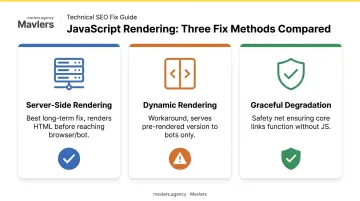
Fixing It: SSR, Dynamic Rendering, and Graceful Degradation
- Server-side rendering (SSR): Renders HTML on the server before it reaches the browser or bot. Best long-term fix for content that must always be crawlable.
- Dynamic rendering: Serves a pre-rendered version to bots and a client-rendered version to users. Google frames this as a workaround, not a permanent solution.
- Graceful degradation: Ensures core content and links function even if JavaScript fails to execute. Useful as a safety net layered onto either approach above.
The business impact is real. One documented Shopify implementation using Fast Simon's search app loaded category content through JavaScript without server-side rendering, alongside duplicate facet URLs and blocked pagination.
After prerendering content into raw HTML and cleaning up the crawl controls, a Search Engine Journal case study found that page-one keyword visibility rose from 4.4% to 10% within three months.
Fixing rendering issues like this demands dedicated engineering bandwidth many agencies simply don't have in-house. Agencies without that capacity typically bring in a white-label development team to close the gap. Mavlers Agency implements SSR, hydration, and dynamic rendering fixes end-to-end across WordPress, Shopify, Webflow, and HubSpot builds, letting agencies deliver enterprise-grade technical SEO without adding headcount.
Rework Mega-Menu Architecture So Link Equity Flows to High-Value Pages
Mega-menus feel helpful. Link to every category, every subcategory, every filter combination, and shoppers can find anything in two clicks. The trouble is that Google reads those links as importance signals too.
When a nav menu links to 200 category pages with equal prominence, you're telling search engines those 200 pages carry similar weight. Google can only reliably crawl standard <a href> links, and sitewide menu placement signals importance. Overcrowd it, and that signal turns into noise.
The Overexposed Low-Value Page Problem
Picture a minor seasonal category, say, "holiday phone cases," sitting in the main nav next to your top revenue driver, "wireless chargers." Both get identical internal link equity from every page on the site. The minor category ends up overexposed relative to its actual business value, while your real moneymaker gets no additional boost.
The fix isn't deletion. It's strategic simplification:
- Keep nav-level links limited to true top-level categories
- Remove nav links to secondary and tertiary pages, but preserve contextual links from parent category pages
- Let breadcrumbs and "related searches" modules handle deeper subcategory discovery
Beyond the main menu, look for other high-leverage linking opportunities:
- High-traffic blog posts linking down into relevant category or product pages
- Related-product modules using keyword-rich anchor text instead of generic "view product" links
- Category pages cross-linking to adjacent categories with genuine topical relevance
- Footer links pointing to the categories you just removed from the nav, giving them an alternate equity pathway
None of this requires ripping apart your information architecture. It requires being deliberate about which pages your homepage and nav are voting for.
Turn Faceted and Category Filters Into Indexable Long-Tail Landing Pages
Faceted navigation, meaning your color, size, brand, and price filters, generates enormous numbers of URL combinations that most SEO teams ignore entirely. That's a mistake, but an understandable one, because the risk-versus-opportunity tradeoff here is genuinely tricky.
Index every filter combination and you create duplicate content and crawl waste. Under-index and you leave high-converting long-tail traffic for competitors to claim.
The scale of that opportunity is bigger than most teams assume. Backlinko's analysis of 306 million keywords found that 91.8% of all search queries are long-tail by count, meaning multi-word, specific searches like "waterproof men's hiking boots size 11." Individually, each query drives modest volume, but collectively, across a catalog with thousands of SKUs, they add up to meaningful revenue.
Building a Controlled Indexing Framework
- Index one filter per URL where possible, such as "/hiking-boots/waterproof" rather than stacking five filters into one URL
- Apply canonicalization for multi-filter combinations that don't warrant a standalone page
- Block low-commercial-value filters (price range, stock status, sort order) using robots.txt or fragment-based URLs rather than letting them crawl freely
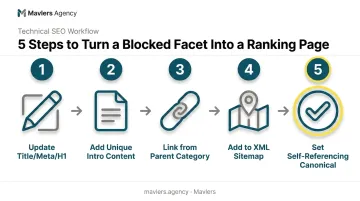
Turning a Blocked Facet Into a Ranking Page
- Update the title tag, meta description, and H1 to match the target facet, not the generic category
- Add unique intro content above the fold, even two or three sentences of genuinely useful context
- Link to it from the parent category page so it's discoverable through normal navigation
- Add it to your XML sitemap
- Set a self-referencing canonical tag so search engines treat it as the definitive version
Even major retailers routinely miss facet-combination opportunities like this. That gap is exactly where smaller, SEO-savvy competitors move in and capture demand first.
Tools and Validation
Run a crawl/indexability report to confirm which faceted URLs are actually indexable versus blocked. Then cross-reference that list with Search Console impressions and clicks data. Facets already generating impressions but sitting unoptimized deserve priority attention first.
Treat UX and Conversion Signals as Core Ranking Inputs
Core Web Vitals aren't a checkbox exercise anymore, and behavioral signals matter more for large ecommerce sites than most teams assume. Google confirms Core Web Vitals feed into ranking systems, though good scores alone don't guarantee top placement.
Still, the conversion economics are unambiguous. Deloitte studied 37 retail, travel, and luxury brands and found that a 0.1-second mobile speed improvement correlated with an 8.4% increase in retail conversions. Page experience and revenue are tightly linked, even before ranking impact enters the picture.
High-Impact Product Page Elements
That link between experience and revenue shows up most clearly on product pages themselves. The ones that support both conversion and SEO depth typically include:
- Comparison tables against similar products
- Tabulated specs, reviews, and FAQs (great for structured data and featured snippets)
- Sizing or fit guidance specific to the category
- Q&A sections addressing pre-purchase objections
- User-generated photos and reviews, which add fresh, unique content Google can't get elsewhere
Auditing the Full Funnel
Walk through your site as a first-time visitor would:
- Is the mega-menu genuinely clear, or overwhelming?
- Does search autosuggest return relevant results, or noise?
- Do breadcrumbs and filters create friction anywhere in the path to checkout?
Pair session-recording and heatmap tools with technical performance reports, such as flagging oversized hero images or intrusive interstitials. This combination prioritizes fixes based on real user behavior rather than internal guesswork.
Mavlers Agency' CRO process follows this exact approach, using AI-assisted heatmap and session analysis before any design changes go live. A page that looks polished but fails to convert drains budget instead of building it.
Build Linkable Assets to Capture Top- and Mid-Funnel Search Demand
Product and category pages almost never earn backlinks on their own. Nobody links to a listing for wireless chargers. They link to genuinely useful, non-commercial resources that solve a real problem.
Linkable Asset Formats That Work
- In-depth buying guides comparing options across a category
- Listicles ("best X for Y use case")
- Calculators or interactive tools that personalize recommendations
- Seasonal or how-to content tied to search trends
An interactive buying guide that asks a shopper three or four questions and returns a personalized product recommendation is a strong example. It's useful, shareable, and naturally earns links from bloggers and review sites in a way a static product page never could.
A Digital PR Process for Brands Starting From Zero
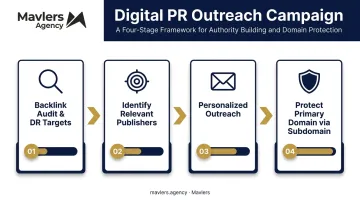
Creating a linkable asset is only half the battle. Brands without existing link momentum need a structured approach to earn coverage for it, not scattered outreach emails:
- Audit the current backlink profile and set realistic Domain Rating targets against competitors
- Identify relevant publishers and creators who cover your category, filtered for editorial quality over sheer volume
- Personalize outreach around real value, not generic pitch templates
- Protect the primary domain during cold outreach, often by routing initial campaigns through a subdomain until relationships are established
Mavlers Agency runs this as a phased engagement. The first two weeks cover a backlink audit and KPI-setting, followed by AI-assisted prospect clustering paired with human-crafted outreach copy in weeks two and three. Live placement tracking through a shared dashboard follows as links go live.
This investment compounds over time: linkable content builds domain authority and expands your keyword footprint into top- and mid-funnel searches. It also channels internal link equity toward the commercial pages that actually convert.
Frequently Asked Questions
What is enterprise SEO?
Enterprise SEO refers to optimizing large, complex websites, often with thousands to millions of URLs. It requires advanced technical strategy, cross-team governance, and scalable content systems beyond standard SEO practices.
How much does enterprise SEO cost?
Costs vary based on site size, complexity, and whether work is in-house or agency-led. Industry surveys put average retainers around $2,900–$3,200/month, though enterprise ecommerce engagements often run higher.
What are the 4 types of SEO?
The commonly cited categories are technical SEO (crawlability, site speed, indexing), on-page SEO (content and metadata), off-page SEO (backlinks and authority), and local SEO (location-based visibility).
Why doesn't Google index my JavaScript-rendered content?
Heavy client-side rendering can delay or prevent Googlebot from seeing content that only appears after user interaction. Fixing this typically requires server-side rendering, dynamic rendering, or graceful degradation.
How many faceted navigation pages should I make indexable?
Only index facet combinations with demonstrated search demand, ideally single-filter URLs. Block low-value or high-combination filters like price ranges to avoid duplicate content and wasted crawl budget.
What makes a piece of ecommerce content a "linkable asset"?
A linkable asset is a genuinely useful, non-promotional resource, like a guide, tool, or calculator, targeting top- or mid-funnel keywords. It earns backlinks naturally by solving a real audience problem.