







Table of contents
Get in touch
Expect response in 4 hours.
.webp)
Your client report says conversions fell 14%. What the chart doesn’t show is that the client reduced the budget halfway through the month and your team excluded an audience producing poor-quality leads.
The problem is that, by report-writing day, these details fly everywhere across Slack threads, task comments, platform histories, and someone’s memory. That is the problem a change log fixes.
A client reporting change log is a shared record that captures the decision-making trail for major changes requested during the project. That’s like giving performance data its missing context. The result is a simple, chronological record of the decisions, events, and interventions that explains shifting requirements. For agencies, this is looking past another reporting widget and building organizational memory.
What is a change log in a client report?
A change log for marketing agencies is a structured record of significant changes made to, or affecting, a client’s marketing program, website, measurement setup, budget, campaign delivery, or business conditions.
Each entry in a good change log explains:
- What changed, and when?
- Why was the change made?
- Who made or requested it?
- Where is the supporting evidence or approval?
- What should the team check next?
For example: “Paused Brand Campaign B after invalid traffic rose above the agreed threshold.” Two weeks later, when CPC, traffic, or lead volume moves, that entry gives the account manager (AM) somewhere useful to start.
A change log is not just a chronological list. It preserves the rationale and authorization behind each approved change. Without it, a project drifts into unmanaged scope creep. And your team and stakeholders have no way to reconstruct why decisions were made months later during a post-mortem or audit.
How is a change log different from an activity log or task list?
A change log records material interventions that could affect performance or how performance should be interpreted. An activity log records completed work. A task list records work still to be done.
Why do marketing agency client reports need a change log?
A client reporting change log keeps the reasoning behind a decision alongside the decision itself. Without that context, an AM may know a budget changed but not the “why” behind it.
The gap widens when white-label partners manage a client account. The client tells the AM a goal. The AM relates it to the white-label partner who assigns it to an isolated execution specialist. By the time it reaches the specialist, the original "why" is often lost. With a change log, it’s easier for information to get diluted as it moves through such a chain.
And when marketing platforms do a good job of recording events but less reliable at preserving intent? Change log becomes more than a supplementary document.
For instance, Google Ads might show that a budget was changed from one amount to another. It will not necessarily tell the AM:
- whether the client requested it;
- whether it was a temporary reallocation;
- what evidence informed the decision;
- what trade-off the team accepted; or
- what outcome the specialist expected.
The same problem seeps across channels. A website release, tracking change, or product shortage may matter to the report even when the marketing team did not cause it.
A shared change log gives the AM the context to explain decisions, probe, and discuss results, without bottlenecking the delivery team.
Moreover, a dated record gives the agency reporting team a starting point for investigation. The team can check what happened before a metric moved and decide what needs closer examination.
One honest limitation: A change log cannot prove that an intervention caused a result. It can show that the two occurred in a relevant sequence and give your team a sensible place to investigate.
Client work piling up, but not ready to hire in-house? Read the agency guide to white-label digital marketing
What changes should a marketing agency record in a change log?
If a change entry would not help someone interpret a result, understand a decision, or avoid repeating an investigation later, it probably belongs in your task-management system instead.
Use one shared log per client, with an area or channel field so entries can be filtered when needed. You do not need a separate log for every channel.
What is the minimum viable change log template for agencies?
The minimum viable change log template for a marketing agency needs fields for date, channel, change, reason, owner, requested by, expected effect, and status. A Google Sheet is enough to start if your team maintains it consistently.
Use these fields:
Add optional fields only when they serve a repeatable purpose. These might include approval status, affected campaign, risk level, or the date the change should be reviewed.
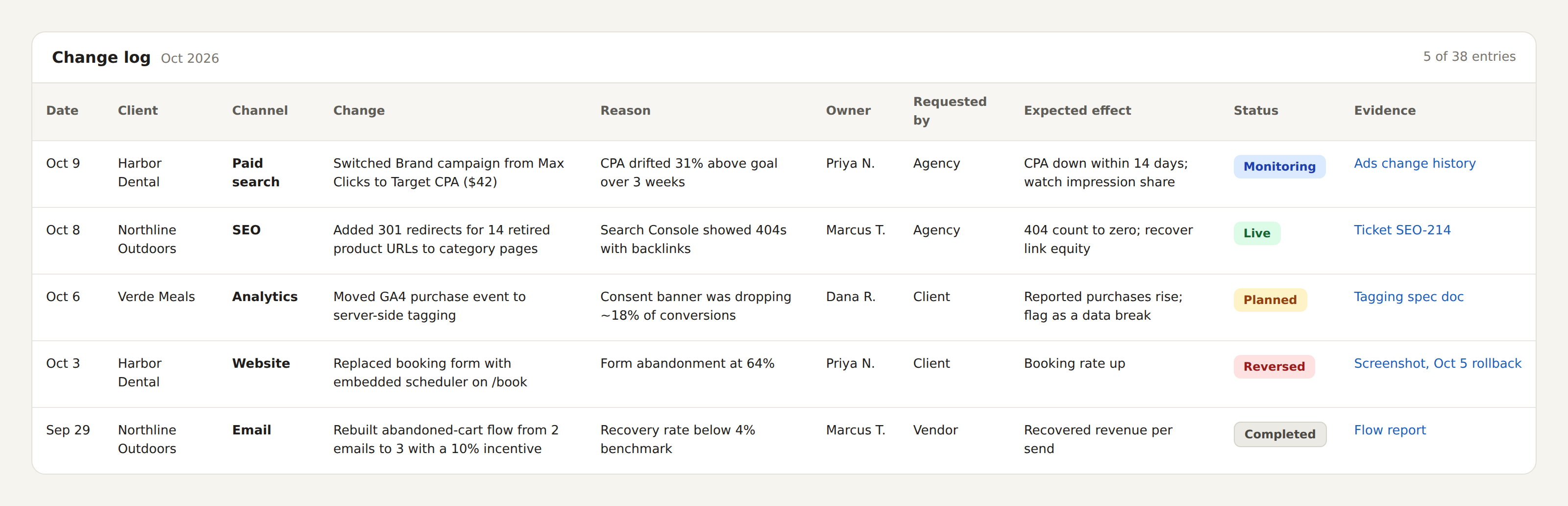
Add optional fields only when they serve a repeatable purpose. Approval status, affected campaign, risk level, and a review date can be useful, but only if people fill them in.
My recommendation: Start painfully small. Smaller than you feel comfortable with. A boring log with just three fields your team actually fills out is more valuable than a beautiful, twenty-column masterpiece that stays empty.
How do you write a change log entry someone else can use?
Write each entry so a colleague can identify the action, understand the reason, and know what to check next. Keep technical detail in linked evidence unless the detail changes the interpretation.
Compare these versions:
Who should maintain the marketing agency change log?
The person making the change should write the initial entry, ideally the same day. The AM checks whether the explanation is clear; the reporting owner decides what the client needs to see. Don’t make the account manager responsible for recovering everyone else’s reasoning at month-end.
Ownership for change log can be divided simply:
Review the log weekly. Use that check to resolve vague entries, assign follow-ups, and remove duplicates.
Keep the process inside an existing agency reporting workflow: add logging to the task-completion checklist and review entries during an established account meeting.
How should a white-label partner hand over change logs to their agency clients?
A white-label partner should document material changes as part of delivery, while your agency checks the record before using it in client communication. Agree on that responsibility before work begins.
The handoff needs four steps:
- The partner records the decision: What changed, why, when, and with what approval
- Your agency reviews it: Check scope, evidence, and anything requiring clarification
- Someone owns the follow-up: Name the person checking the expected effect
- Your agency prepares the client explanation: Include the decision and relevant uncertainty
If the reason is missing, send the entry back. Don’t make your AM invent a plausible explanation because the report is due.
More on: White label partner onboarding process - How Mavlers Agency goes from first call to delivery
Where should the change log live?
Keep the working log where your team already works. Then surface a clean summary in the client report.
In our experience, Google Sheets is the simplest change log doc for most of the agencies. It is easy to share internally, filter by reporting period, assign owners, add dropdowns, and standardize across accounts. Google Sheets can also be connected to Looker Studio, so a team can maintain the operational log in Sheets and display a selected, filtered view in a report.
A simple setup by tool -
If the working record and client report live in different places, decide which is the source of truth. Two editable versions invite conflicting updates.
Should clients see the full change log?
Usually, no. Your internal log may include operational detail, unresolved hypotheses, technical notes, or linked conversations. Giving clients direct access to all of it can create noise rather than transparency.
A better way to maintain a simple change log has two layers:
FAQs
Should reversed changes stay in the change log?
Yes. Keep the original entry and record the reversal with its reason. Otherwise, a later review may miss why performance or delivery changed twice.
How do you avoid duplicate entries in the change logs?
Assign one entry owner to each material change and link related tasks to that record. Use the weekly review to combine duplicates without losing useful evidence.
Is a separate change log always necessary?
A separate document isn’t necessary if your existing project system already captures decisions, reasons, dates, and evidence in a retrievable way. Use that record rather than asking the team to maintain the same information twice.
How can you tell whether the change log process is helping?
Check whether your account manager can answer basic questions from the record: what changed, why, and what happens next. Repeated follow-up messages are a sign that entries need improvement.
How should agencies track changes made by a white-label partner?
Don't make the account manager reconstruct them later. Ask the person doing the work to record material changes while the context is still fresh. The agency can then review those entries and pull the ones that matter into client reporting.
Who owns the change log when marketing work is outsourced?
The person closest to the change should make the initial entry. The agency still owns the client-facing version because it owns the client relationship. In practice, that usually means the specialist documents the change and the account manager decides how it should be communicated.
What should a white-label change log include?
At minimum, capture the date, channel or service, change, reason, owner, expected effect, status, and supporting evidence. If the work is being delivered by an external team, also record who requested the change when that context matters.
Stop rebuilding client reports from scattered updates
Your clients trust you to know what’s happening behind the scenes, even when your team isn’t doing all the work in-house. Mavlers Agency gives agencies white-label SEO, content, web, and marketing-automation support - backed by detailed reporting and change-log workflows that keep client communication clear.